Getting Started with GoldenPipe: Clean Data in Python
Add a production-ready data quality pipeline to your Python backend in 5 minutes. One pip install, one function call, zero config. CSV-friendly.
Your backend accepts a CSV upload from a customer. You parse it, dump it into the database, and move on. Two weeks later, someone notices 400 duplicate records, phone numbers in 6 different formats, and a "date of birth" column where half the values are in MM/DD/YYYY and the other half are YYYY-MM-DD.
Sound familiar? This is the problem GoldenPipe solves.
What GoldenPipe Does
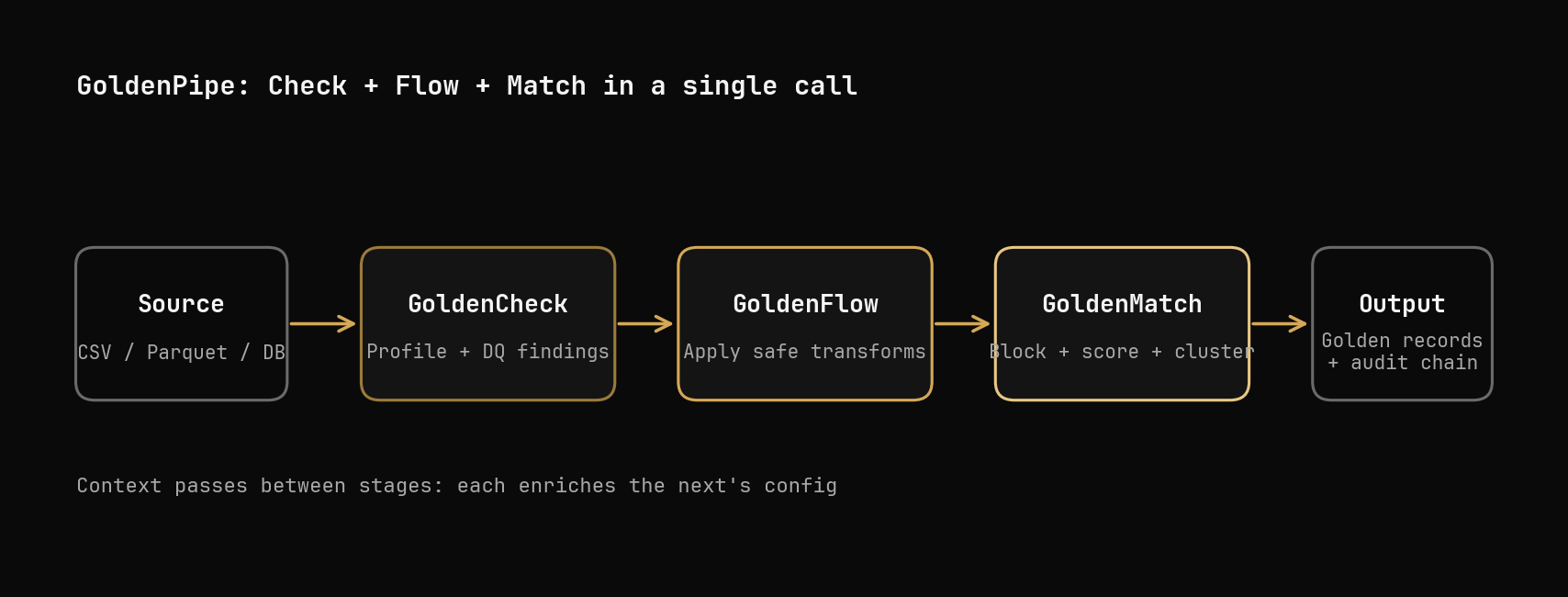
GoldenPipe is a Python library that chains three operations into one call:
- Scan the data for quality issues (via GoldenCheck)
- Fix the issues it finds — normalize phones, dates, emails, whitespace (via GoldenFlow)
- Deduplicate records — find and merge duplicates using fuzzy matching (via GoldenMatch)
The key: it does all three automatically. No config files, no manual rules, no "figure out which columns are phone numbers." It profiles your data, decides what to fix, and runs the right pipeline.
Install
One package pulls in the entire Golden Suite:
pip install goldenpipe
That's it. GoldenCheck, GoldenFlow, and GoldenMatch are all installed as dependencies.
What Your Messy Data Looks Like
Let's say this is customers.csv — a real-world CRM export with the usual problems:
first_name, last_name, email,          phone,          zip_code
John,       Doe,       john@acme.com,  555-0100,       10001
jane,       smith,     JANE@TEST.ORG,  (555) 020-0200, 90210
John,       Doe,       john@acme.com,  5550100,        10001
Bob,        Johnson,   bob.j@mail.com, +15550300,      30301
  alice,    Williams,  alice@net.com,  555.0400,       60601
bob,        johnson,   bob.j@mail.com, 15550300,       30301
Six records, but only four real people. John Doe appears twice (identical data). Bob Johnson appears twice (different capitalization, different phone format). Jane has an uppercase email. Alice has leading whitespace. Every phone number is in a different format.
This is what GoldenPipe was built for.
Your First Pipeline
import goldenpipe as gp

result = gp.run("customers.csv")

print(result.status)     # PipeStatus.SUCCESS
print(result.input_rows) # 6
That one call scanned the data, fixed the formatting, and deduplicated the records. Let's look at what each stage actually did.
What GoldenCheck Finds
The first stage profiles every column and reports quality issues:
print(result.reasoning)
# {
#   "goldencheck.scan": "Profiling input data for quality issues",
#   "goldenflow.transform": "Found 3 fixable issues: phone_format, date_format, whitespace",
#   "goldenmatch.dedupe": "Standard deduplication — no sensitive fields detected"
# }
GoldenCheck would flag:
- phone_format: 4 different phone formats detected (dashes, parens, dots, plus prefix)
- whitespace: leading spaces on
alice - case_inconsistency: mixed case in email and name columns
It doesn't fix anything — it just reports. The next stage decides what to do with the findings.
What GoldenFlow Fixes
Based on what GoldenCheck found, GoldenFlow auto-applies the right transforms. Here's what the data looks like after transformation:
| Before | After | What changed |
|---|---|---|
555-0100 | 5550100 | Normalized to digits |
(555) 020-0200 | 5550200200 | Stripped parens, dashes, spaces |
JANE@TEST.ORG | jane@test.org | Lowercased email |
alice | alice | Stripped whitespace |
john | John | Title-cased names |
GoldenFlow doesn't just blindly run every transform — it only applies what GoldenCheck flagged. If your phone numbers were already consistent, the phone normalizer wouldn't run.
What GoldenMatch Deduplicates
After cleaning, GoldenMatch finds records that refer to the same person:
- Cluster 1:
John Doe, john@acme.com(rows 1 and 3) — exact match after normalization - Cluster 2:
Bob Johnson, bob.j@mail.com(rows 4 and 6) — fuzzy name match + exact email - Singleton:
Jane Smith— no duplicates - Singleton:
Alice Williams— no duplicates
Result: 6 input rows → 4 unique records. The duplicates are merged into "golden records" that combine the best data from each duplicate.
Understanding the Full PipeResult
The result object tells you everything that happened:
result = gp.run("customers.csv")

# What stages ran?
print(result.stages)
# {"goldencheck.scan": ..., "goldenflow.transform": ..., "goldenmatch.dedupe": ...}

# Why did each stage run?
print(result.reasoning)
# {
#   "goldencheck.scan": "Profiling input data for quality issues",
#   "goldenflow.transform": "Found 3 fixable issues: phone_format, whitespace, case",
#   "goldenmatch.dedupe": "Standard deduplication — no sensitive fields detected"
# }

# What was skipped?
print(result.skipped)   # [] — nothing skipped

# How long did each stage take?
print(result.timing)    # {"goldencheck.scan": 0.3, "goldenflow.transform": 0.5, "goldenmatch.dedupe": 1.2}

# Any errors?
print(result.errors)    # [] — no errors
The reasoning field is important — it tells you why the pipeline made each decision. If GoldenFlow was skipped, reasoning will say "No fixable quality issues found." If privacy-preserving matching was used instead of standard dedup, it'll say "Sensitive fields detected (ssn, date_of_birth) — routing to PPRL mode."
Adding It to a FastAPI Backend
Here's how you'd wire GoldenPipe into a real backend that accepts CSV uploads:
from fastapi import FastAPI, UploadFile, File, HTTPException
import goldenpipe as gp
import tempfile
import os

app = FastAPI()

MAX_FILE_SIZE = 5 * 1024 * 1024  # 5 MB

@app.post("/api/upload")
async def upload_csv(file: UploadFile = File(...)):
    # Validate file size
    contents = await file.read()
    if len(contents) > MAX_FILE_SIZE:
        raise HTTPException(413, "File too large (max 5 MB)")

    # Save to temp file
    with tempfile.NamedTemporaryFile(suffix=".csv", delete=False) as tmp:
        tmp.write(contents)
        tmp_path = tmp.name

    try:
        result = gp.run(tmp_path)

        if result.errors:
            raise HTTPException(500, f"Pipeline failed: {result.errors}")

        return {
            "status": str(result.status),
            "input_rows": result.input_rows,
            "reasoning": result.reasoning,
            "timing": result.timing,
            "stages_run": list(result.stages.keys()),
            "stages_skipped": result.skipped,
        }
    finally:
        os.unlink(tmp_path)
Every CSV that comes in gets scanned, cleaned, and deduplicated before it touches your database. The response tells the caller exactly what happened and why.
Getting the Cleaned Data Out
gp.run() returns metadata about what happened, but if you need the actual cleaned DataFrame to write to your database, run the stages directly:
import polars as pl
import goldenflow
import goldenmatch

# Load the raw data
df = pl.read_csv("customers.csv")
print(f"Input: {df.height} rows")
# Input: 6 rows

# Stage 1: Transform (fix formatting)
flow_result = goldenflow.transform_df(df)
cleaned = flow_result.df
# Phones normalized, emails lowercased, whitespace stripped

# Stage 2: Deduplicate (merge duplicates)
match_result = goldenmatch.dedupe_df(cleaned)
unique_records = match_result.unique
print(f"Output: {unique_records.height} unique records")
# Output: 4 unique records

# Save the golden records
unique_records.write_csv("golden_customers.csv")
This gives you full control over each stage while still using the Golden Suite tools under the hood.
Controlling What Runs
Sometimes you don't need all three stages. Maybe you just want to scan and transform, without deduplication:
from goldenpipe import Pipeline, PipelineConfig, StageSpec

config = PipelineConfig(
    pipeline="check-and-clean",
    stages=[
        StageSpec(use="goldencheck.scan"),
        StageSpec(use="goldenflow.transform"),
        # omit goldenmatch.dedupe — no deduplication
    ],
)

pipeline = Pipeline(config=config)
result = pipeline.run(source="customers.csv")
Or skip straight to deduplication if you know the data is already clean:
config = PipelineConfig(
    pipeline="dedupe-only",
    stages=[
        StageSpec(use="goldenmatch.dedupe"),
    ],
)
The Adaptive Behavior
What makes GoldenPipe different from just calling three libraries in sequence is the adaptive logic. It makes decisions based on what it finds:
- No quality issues? GoldenFlow is skipped entirely. No wasted processing.
- Sensitive fields detected (SSN, date of birth)? Routes to privacy-preserving matching (PPRL) instead of standard fuzzy matching. This uses bloom filter encryption so PII is never compared in plaintext.
- All stages fail? Returns
PipeStatus.FAILEDwith clear error messages instead of crashing your backend.
You get this for free — no configuration needed.
Common Gotchas
"My pipeline runs but nothing gets deduplicated." GoldenMatch needs at least one text column with enough variation to build blocking keys. If your CSV only has numeric IDs and booleans, there's nothing to fuzzy-match on. Add name or email columns.
"GoldenFlow changed values I didn't want changed." Zero-config mode is conservative — it only applies safe transforms (whitespace, phone normalization, email lowercasing). But if you need to lock specific columns, pass a config to disable auto-transforms on those fields.
"The pipeline is slow on large files." GoldenMatch's deduplication is the bottleneck on large datasets (it compares records pairwise within blocks). For files over 50K rows, use GoldenMatch's --backend ray option for distributed processing, or limit the pipeline to scan + transform only.
What's Next
Once you have GoldenPipe running in your backend, you can:
- Add infermap to auto-map incoming CSV columns to your database schema before the pipeline runs:
pip install infermap - Customize transforms by passing a GoldenFlow config for domain-specific rules (phone formats, date standards)
- Customize matching by passing a GoldenMatch config with your own match keys, scorers, and thresholds
- Add to CI with
goldenpipe run data.csv --strictto fail builds if quality drops below a threshold
Key Takeaways
pip install goldenpipegives you the entire Golden Suite in one installgp.run("file.csv")scans, transforms, and deduplicates with zero config- The pipeline adapts to your data — skips unnecessary stages, routes to privacy mode when needed
result.reasoningexplains every decision the pipeline made- For DataFrame access, use
goldenflow.transform_df()andgoldenmatch.dedupe_df()directly - Works in any Python backend — FastAPI, Django, Flask, or plain scripts
Try it on your own data — upload a CSV and see the full pipeline run in your browser, no installation needed.
Related posts
Entity Resolution on 208K Real Records with Golden Suite
We ran the full Golden Suite pipeline on 208,505 real NC voter registration records. 61 quality findings, 197K addresses cleaned, 10,718 duplicate clusters found — all in 34 seconds with zero config.
2026-03-30
From Dirty CSV to Golden Records: A Python Walkthrough
Take 5,400 messy CMS hospital records from raw CSV to deduplicated golden records. Three approaches compared: zero-config, explicit tuning, LLM boost.
2026-04-06
Pipe Your SaaS Data to Your Warehouse: A Funnel That Doesn't Own It
Most MDM tools want to be your source of truth — you query their store. bensevern.dev inverts that: it's a matching funnel between your SaaS sources and your warehouse, then hands the data back. Here's what that looks like end-to-end.
2026-05-23