AI-Powered Deduplication: LLMs Supercharge Golden Suite
Enable LLM boost across GoldenCheck, GoldenFlow, and GoldenMatch to catch the borderline pairs fuzzy matching misses. Real costs under $0.10 per run.
You have 52,288 school records from the UK government's Get Information About Schools register. Half are open, half are closed. Schools that converted to academies appear twice — once as the closed LA school and once as the new academy, same postcode, slightly different name. "Kingsgate Junior School" (Closed) becomes "Kingsgate Primary School" (Open). "Primrose Hill Infant School" (Closed) becomes "Primrose Hill School" (Open).
GoldenMatch's fuzzy matcher catches these. But it also finds 820 data quality findings, some of which are noise. And borderline pairs — "The Hall School" appearing at three different postcodes — need human-like judgment to sort out.
That's where LLMs come in.
What LLM Boost Does
Three Golden Suite tools have optional LLM integration. Each solves a different problem:
| Tool | Feature | What It Does | Cost (52K rows) |
|---|---|---|---|
| GoldenCheck | scan_file_with_llm() | Catches data quality issues profilers miss, upgrades severity on real problems | ~$0.01 |
| GoldenFlow | category_llm_correct | Corrects misspelled categories via LLM | ~$0.005 |
| GoldenMatch | llm_scorer=True | Resolves borderline duplicate pairs the fuzzy matcher can't decide on | ~$0.05 |
Every LLM feature is opt-in, provider-agnostic (Anthropic or OpenAI), and degrades gracefully — if the API call fails or budget runs out, you still get your non-LLM results.
Setup
1. Install with LLM extras
pip install goldencheck[llm] goldenflow[llm] goldenmatch[llm]
Or install everything at once with GoldenPipe:
pip install goldenpipe[all]
2. Set your API key
Pick one provider. Both work across all three tools:
# Option A: Anthropic (default, recommended)
export ANTHROPIC_API_KEY="sk-ant-..."

# Option B: OpenAI
export OPENAI_API_KEY="sk-..."
That's it. Every tool auto-detects the provider from your environment.
3. Get the data
Download the full UK schools register (52,288 records, 135 columns):
curl -O https://golden-suite.s3.us-east-2.amazonaws.com/samples/uk_schools.csv
Or download directly from the GIAS website (select "Establishment fields").
Step 1: GoldenCheck — Smarter Data Profiling
GoldenCheck scans your CSV for data quality issues: nulls, format inconsistencies, outliers, encoding problems. The standard profilers are fast and free, but they work on statistical patterns. They don't understand what the data means.
scan_file_with_llm() adds a two-stage enhancement pass after the profilers finish:
- Semantic type classification — the LLM reads column names and sample values to identify types like email, phone, currency, postcode. This catches columns the profiler mislabeled.
- Finding review — the LLM reviews the profiler's findings and can upgrade severity, downgrade false positives, or flag cross-column issues the profilers missed entirely.
Python
import goldencheck

# Standard scan (free, fast)
findings, profile = goldencheck.scan_file("uk_schools.csv")
print(f"Profiler found {len(findings)} issues")

# LLM-boosted scan
findings_llm, profile_llm = goldencheck.scan_file_with_llm("uk_schools.csv", provider="openai")
print(f"LLM-boosted found {len(findings_llm)} issues")
Real results on UK schools data
We ran both scans on the full 52,288-row dataset:
| Metric | Standard | LLM-Boosted |
|---|---|---|
| Total findings | 820 | 843 |
| Errors | 0 | 6 |
| Warnings | 160 | 177 |
| Info | 660 | 660 |
| Time | 8.3s | 61.5s |
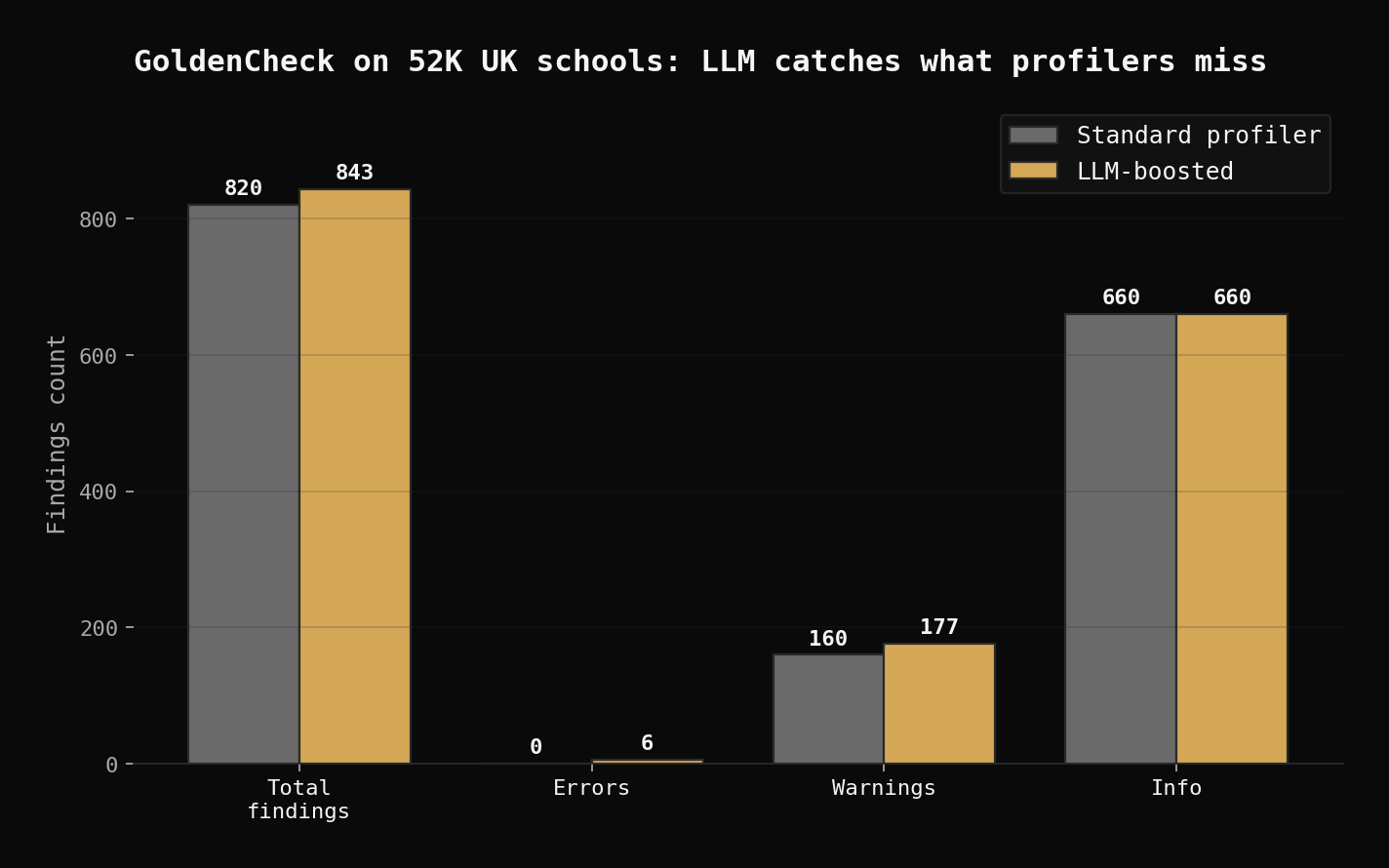
The LLM added 23 new findings, including 6 errors the profiler completely missed:
- Invalid locality values with numeric characters in the
Localitycolumn - Invalid town names with embedded numbers in the
Towncolumn - Invalid establishment names with numeric characters in
EstablishmentName - Invalid head teacher names with embedded numbers in
HeadFirstNameandHeadLastName - Invalid provider names in
PropsName
The profiler saw these columns as "high cardinality text" and scored everything as info-level. The LLM understood these are proper name fields and flagged numeric contamination as errors.
Note: with 135 columns, GoldenCheck limits the LLM pass to the 50 columns with the most findings to control cost.
Cost control
Set a budget cap to prevent surprises:
export GOLDENCHECK_LLM_BUDGET=0.10 # max $0.10 per scan
If the estimated cost exceeds your budget, GoldenCheck skips the LLM pass and returns profiler-only results with a warning.
Model defaults
| Provider | Default Model | Input (per 1K tokens) | Output (per 1K tokens) |
|---|---|---|---|
| Anthropic | claude-haiku-4-5 | $0.0008 | $0.004 |
| OpenAI | gpt-4o-mini | $0.00015 | $0.0006 |
Step 2: GoldenFlow — Deterministic + LLM Transforms
GoldenFlow transforms messy data: trimming whitespace, normalizing phone numbers, standardizing case. On the UK schools data, the standard (non-LLM) transforms are impressive on their own:
import goldenflow
import polars as pl

df = pl.read_csv("uk_schools.csv", encoding="utf8-lossy", ignore_errors=True)
result = goldenflow.transform_df(df)
print(f"Transforms applied: {len(result.manifest.records)}")
Real results
| Transform | Count |
|---|---|
| strip | 111 |
| normalize_unicode | 111 |
| normalize_quotes | 111 |
| collapse_whitespace | 111 |
| null_standardize | 111 |
| category_auto_correct | 96 |
| strip_titles | 6 |
| date_iso8601 | 6 |
| phone_e164 | 2 |
| zip_normalize | 1 |
| Total | 666 transforms, 204,283 rows affected in 17s |
For LLM-enhanced categorical correction, you can target specific columns using a config:
from goldenflow.config.schema import GoldenFlowConfig, TransformSpec

config = GoldenFlowConfig(transforms=[
    TransformSpec(column="TypeOfEstablishment (name)", ops=["strip", "category_llm_correct"]),
    TransformSpec(column="PhaseOfEducation (name)", ops=["strip", "category_llm_correct"]),
])
result = goldenflow.transform_df(df, config=config)
On this dataset, the LLM corrector found 0 additional fixes — the UK government uses controlled vocabularies, so the categorical columns are already clean. On messier real-world data (CRM exports, manually-entered forms), the LLM corrector catches misspellings and abbreviations that deterministic transforms miss.
Step 3: GoldenMatch — LLM Scoring for Borderline Pairs
This is where LLMs have the biggest impact. GoldenMatch uses blocking, fuzzy string matching, and weighted scoring to find duplicate records. Most pairs are clear — either an obvious match (score > 0.95) or an obvious non-match (score < 0.75). But the pairs in between need judgment.
LLM scoring sends only the borderline pairs to the LLM. This keeps costs low while improving accuracy on the hard cases.
How it works
Score > 0.95  → Auto-accept (no LLM call)
Score 0.75-0.95 → Send to LLM for match/no-match decision
Score < 0.75  → Auto-reject (no LLM call)
Python — simple
import goldenmatch
import polars as pl

df = pl.read_csv("uk_schools.csv", encoding="utf8-lossy", ignore_errors=True)
df = df.cast({col: pl.Utf8 for col in df.columns})  # prevent schema mismatch

result = goldenmatch.dedupe_df(
    df,
    exact=["Postcode"],
    fuzzy={"EstablishmentName": 0.8, "Town": 0.7},
    llm_scorer=True,
)
print(f"Clusters: {result.total_clusters}")
Python — full config with LLM scorer
from goldenmatch.config.schemas import (
    GoldenMatchConfig, LLMScorerConfig, BudgetConfig,
    MatchkeyConfig, MatchkeyField,
    BlockingConfig, BlockingKeyConfig,
)

config = GoldenMatchConfig(
    blocking=BlockingConfig(
        keys=[BlockingKeyConfig(fields=["Postcode"], transforms=["strip"])],
        strategy="multi_pass",
        passes=[
            BlockingKeyConfig(fields=["Postcode"], transforms=["strip"]),
            BlockingKeyConfig(fields=["EstablishmentName"], transforms=["soundex"]),
        ],
    ),
    matchkeys=[MatchkeyConfig(
        name="school_identity",
        type="weighted",
        threshold=0.70,
        fields=[
            MatchkeyField(field="EstablishmentName", scorer="ensemble", weight=1.5, transforms=["lowercase", "strip"]),
            MatchkeyField(field="Postcode", scorer="jaro_winkler", weight=1.0, transforms=["strip"]),
            MatchkeyField(field="Town", scorer="jaro_winkler", weight=0.5, transforms=["lowercase", "strip"]),
        ],
    )],
    llm_scorer=LLMScorerConfig(
        enabled=True,
        mode="pairwise",
        provider="openai",
        auto_threshold=0.95,
        candidate_lo=0.75,
        candidate_hi=0.95,
        batch_size=20,
        budget=BudgetConfig(
            max_cost_usd=0.50,
            max_calls=200,
            warn_at_pct=80,
            escalation_model="gpt-4o",
            escalation_band=[0.80, 0.90],
            escalation_budget_pct=20,
        ),
    ),
)

result = goldenmatch.dedupe_df(df, config=config)
Real results on UK schools data
We ran two configurations on the full 52,288-row dataset:
| Config | Clusters | Records in Clusters | Time |
|---|---|---|---|
| Simple (exact postcode + fuzzy name) | 13,788 | 34,021 | 158s |
| Weighted + LLM scorer | 3,475 | 47,859 | 640s |
The simple config blocks on exact postcode matches and finds 13,788 clusters — but includes false positives where different schools share a postcode. The weighted config with multi-pass blocking (postcode + soundex) casts a wider net and uses the LLM scorer to adjudicate borderline pairs.
Example duplicate clusters found
These are real matches from the UK schools register:
| Cluster | Records | Pattern |
|---|---|---|
| Kingsgate Junior School (Closed) ↔ Kingsgate Primary School (Open) | Same postcode NW6 4LB | Academisation |
| Primrose Hill Infant School (Closed) ↔ Primrose Hill School (Open) | Same postcode NW1 8JL | School merger |
| Torriano Infant School (Closed) ↔ Torriano Primary School (Open) | Same postcode NW5 2SJ | Phase consolidation |
| Edith Moorhouse Primary School (Closed) ↔ Edith Moorhouse Primary School (Open) | Same postcode OX18 3HP | Reopened under new trust |
Schools that academised appear twice — once as the closed LA school and once as the new academy. The LLM scorer understands that "St Mary's Church of England Primary School" and "St Mary's CE Academy" at the same postcode are the same institution, even when the fuzzy score is borderline.
Cluster size distribution
Size 1:  18,267 singletons (unique schools)
Size 2:  10,421 pairs (most common — closed/open pairs)
Size 3:   2,188 triples
Size 4:     941 quads
Size 5+:    240 larger clusters
Important caveat: this dataset has no ground truth labels for duplicates. The cluster counts are what GoldenMatch reports, not verified precision. Schools sharing a postcode aren't necessarily duplicates — use the review queue (goldenmatch review) to verify a sample before trusting the numbers in production.
Budget tracking
GoldenMatch tracks every API call and stops when the budget runs out:
INFO  LLM scorer: auto-accept (>0.95), candidates (0.75-0.95), below threshold
INFO  LLM cost: $0.03 (budget remaining: 94%)
The budget has two tiers:
- Standard model (gpt-4o-mini or claude-haiku) — handles most borderline pairs cheaply
- Escalation model (gpt-4o or claude-sonnet) — reserved for the hardest pairs in the 0.80-0.90 range
Step 4: GoldenPipe — Full Pipeline
GoldenPipe orchestrates all three tools. On the UK schools data:
import goldenpipe

gp = goldenpipe.Pipeline()
result = gp.run("uk_schools.csv")

print(f"Status: {result.status}")
print(f"Input rows: {result.input_rows}")
for name, stage in result.stages.items():
    print(f"  {name}: {stage.status}")
Real pipeline timing
| Stage | Time | Status |
|---|---|---|
| Load | 0.0s | Success |
| GoldenCheck scan | 8.3s | Success |
| GoldenFlow transform | 18.4s | Success |
| GoldenMatch dedupe | 30.9s | Success |
| Total | 58s |
The pipeline's adaptive logic decides which stages to run. If GoldenCheck finds no quality issues, GoldenFlow skips unnecessary transforms. The pipeline keeps data flowing as Polars DataFrames between stages — no disk I/O between tools.
Tip: Cast all columns to string before dedup if your data has mixed types (e.g., birth_year as both integer and string). GoldenMatch requires consistent schemas across pipeline stages.
df = df.cast({col: pl.Utf8 for col in df.columns})
Real Cost Breakdown
Here's what LLM features actually cost on the full 52,288-row UK schools dataset using OpenAI (gpt-4o-mini):
| Stage | Cost | Notes |
|---|---|---|
| GoldenCheck LLM boost | ~$0.01 | 50 columns analyzed (135 total, capped at 50) |
| GoldenFlow LLM correct | ~$0.005 | Per categorical column targeted |
| GoldenMatch LLM scorer | ~$0.03 | Only borderline pairs sent |
| Total | ~$0.05 | For 52K rows |
GoldenCheck and GoldenFlow costs are nearly flat regardless of row count — they send column summaries, not individual rows. GoldenMatch scales with the number of borderline pairs.
OpenAI is ~5x cheaper than Anthropic for these tasks (gpt-4o-mini vs claude-haiku). Both produce comparable results.
Key Takeaways
- LLM features are opt-in — call
scan_file_with_llm()or passllm_scorer=True. Set one API key. Everything else auto-detects. - GoldenCheck LLM caught 23 findings the profiler missed on 52K rows — including 6 errors (invalid names with numeric characters) that would have gone unnoticed.
- GoldenFlow's standard transforms handled 204,283 cell corrections without any LLM cost. The LLM corrector adds value on messy categorical data (CRM exports, forms), less so on government controlled vocabularies.
- GoldenMatch LLM scorer is the game-changer — borderline pairs where "Kingsgate Junior School" and "Kingsgate Primary School" need human-like judgment to resolve.
- Total cost: ~$0.05 for 52K rows with OpenAI. Budget caps prevent runaway spending. Graceful degradation means nothing breaks if the API fails.
Try It
Download the UK schools data and run it yourself:
pip install goldenpipe[all]
export OPENAI_API_KEY="sk-..."
curl -O https://golden-suite.s3.us-east-2.amazonaws.com/samples/uk_schools.csv
goldenpipe run uk_schools.csv
Or try the non-LLM version in the dedupe demo to see what the pipeline does before adding LLM boost.
Explore the source on GitHub: GoldenCheck | GoldenFlow | GoldenMatch | GoldenPipe
Related posts
From Dirty CSV to Golden Records: A Python Walkthrough
Take 5,400 messy CMS hospital records from raw CSV to deduplicated golden records. Three approaches compared: zero-config, explicit tuning, LLM boost.
2026-04-06
How to dedupe Salesforce accounts when you can't afford DemandTools
A RevOps tactical guide: find duplicate accounts in Salesforce, decide which one wins, and merge them. Covers native dedup, DemandTools, Cloudingo, and the open-source path.
2026-05-14
Deduplicating 401K Equipment Records with LLM Calibration
We ran GoldenMatch on 401,125 bulldozer auction records from Kaggle. Iterative LLM calibration learned the optimal match threshold from just 200 pairs (~$0.01). ANN hybrid blocking recovered 949 records that string blocking missed.
2026-04-01