How to dedupe Salesforce accounts when you can't afford DemandTools
A RevOps tactical guide: find duplicate accounts in Salesforce, decide which one wins, and merge them. Covers native dedup, DemandTools, Cloudingo, and the open-source path.
If you run RevOps at a B2B SaaS company between 50 and 500 employees, you almost certainly have a duplicate-accounts problem in Salesforce. You may not have admitted it out loud yet, but you have it.
The symptoms are familiar:
- Two SDRs work the same account because it's spelled "Acme Corp" in one record and "Acme Corporation" in another.
- Pipeline reports double-count opportunities because deals split across duplicate accounts.
- Marketing attribution is broken because a single buyer's MQLs land on three different account objects.
- The customer-success team complains that their renewals dashboard doesn't tie to the same number as Sales' bookings dashboard.
The longer this goes unfixed, the worse it gets. Each new SDR onboarding creates more duplicates. Each new integration (HubSpot, Marketo, Outreach) pushes records back into Salesforce without matching against existing accounts. The problem compounds.
This post walks through the four real options for fixing it: native Salesforce dedup (free, limited), DemandTools or Cloudingo ($800-$1500/user/year), DIY with a Python script (free, your time), and the open-source middle path. I'll be honest about which one fits which company size and which has hidden costs.
Step zero: measure the problem before you spend a dollar
Before any tool decision, you need to know how bad it is. Run this SOQL query in the Developer Console:
SELECT Name, COUNT(Id) cnt
FROM Account
WHERE IsDeleted = false
GROUP BY Name
HAVING COUNT(Id) > 1
ORDER BY COUNT(Id) DESC
LIMIT 100
This catches the exact-name duplicates. It misses everything else (different spellings, abbreviations, missing punctuation), so multiply the result by 3-5x for a realistic estimate of total duplicates.
For a more honest count, export your Account table to CSV and run a fuzzy-match pass locally. The dedupe Python library is free and will give you a numeric duplicate rate in an afternoon. I've seen healthy Salesforce orgs at 3-8% duplicates; messy ones at 15-25%; truly neglected ones at 35%+.
Once you have a number, the rest of the decision is easier. If your duplicate rate is under 5% and you only have 10k accounts, the tools-decision tree below is overkill — just run a one-time cleanup yourself. If your rate is 10%+ across 100k+ accounts, you need a real solution.
Option 1: Salesforce's native Matching Rules + Duplicate Rules
Cost: $0 (included in every Salesforce edition).
How it works: You define a Matching Rule (e.g., "match accounts where Name is fuzzy-equal AND Billing City is exact"). You define a Duplicate Rule that uses the Matching Rule. Salesforce then either blocks duplicate creation, warns the user, or flags it for review.
What it's good for: Stopping new duplicates from being created going forward. The block/warn-on-create flow genuinely works for SDR data entry.
What it's terrible for: Cleaning up the duplicates that already exist. Salesforce's native tooling has no bulk-merge UI. You merge accounts one at a time, manually, through the standard Merge Accounts wizard. At 1000 duplicates, this is a 40-hour project. At 10,000, it's a quarter.
When this is enough: You have <500 accounts, you're cleaning up after a one-time data import, and you can afford a half-day of manual merging.
When it isn't: Anything bigger. Native dedup is a guardrail for future data, not a cleanup tool for past data.
Option 2: DemandTools ($1,200/user/year)
Cost: ~$1,200/user/year for the standard tier. You typically need 1-3 admin users.
How it works: Browser-based UI on top of Salesforce. Bulk-dedup wizard surfaces duplicate clusters, lets you pick a master record per cluster, and applies the merge through the Salesforce API. Has scenario-tracking so you can save matching rules and rerun them.
What it's good for: Mid-sized cleanups (5k-50k accounts). The UX for the master-record-selection step is good — you can see all the field values side-by-side and pick which wins per field, not just which row wins overall. Saves a lot of "wait, but the older record has the better address" annoyance.
What it's not good for: Cross-system dedup. DemandTools is Salesforce-only. If your duplicates exist because Salesforce ingests from Marketo and Outreach and Stripe and they all spell the company differently, DemandTools fixes the symptom but not the cause.
The hidden cost: DemandTools sits on top of Salesforce's API. Your bulk-merge runs eat into your daily API quota. On a 100k-account dedup, you can blow through a day's API budget in an hour. Plan around an API-intensive run window.
When this wins: You have $1,500-$5,000/year of RevOps tooling budget, your duplicate problem is contained to Salesforce, and you want a tool that's been around for 15 years and is procurement-easy to approve.
When it doesn't: You're cost-constrained, or your duplicate problem is fundamentally cross-system.
Option 3: Cloudingo ($1,000-$5,000/year)
Similar to DemandTools, slightly different UX. Most of the same trade-offs apply. The honest summary: if you're choosing between DemandTools and Cloudingo, pick whichever one your trial preference lands on. They're roughly equivalent. Cloudingo's pricing is more elastic per user; DemandTools' brand recognition is higher in procurement.
Option 4: DIY with a Python script
Cost: $0 in license. 2-4 weeks of one engineer's time to land version 1, then ongoing maintenance.
How it works:
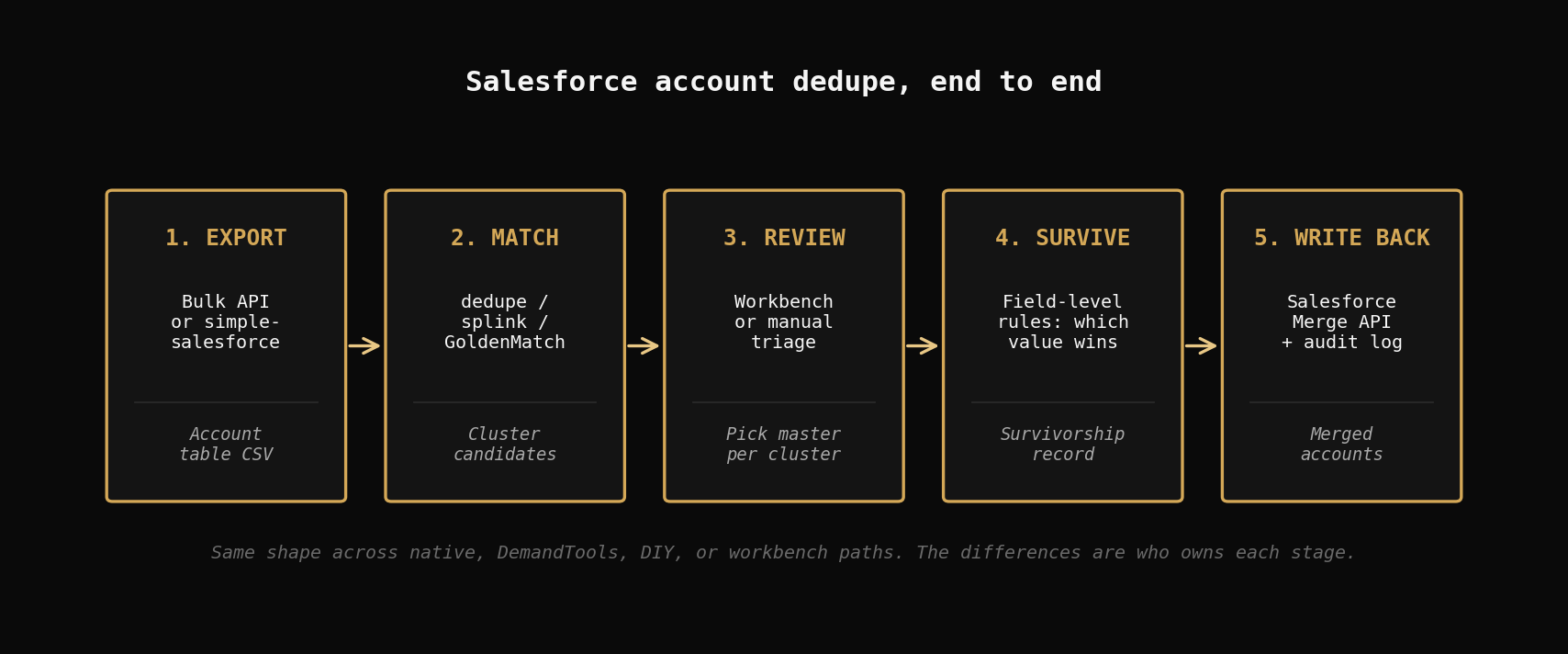
- Export Account table via the Salesforce Bulk API or
simple_salesforcePython library. - Run
dedupeorsplinkor any other Python matching library to produce clusters. - For each cluster, write a Python rule to pick the master record (e.g., "highest Annual Revenue wins; tie-break on most recent LastModifiedDate").
- Use the Salesforce REST API to invoke the merge endpoint per cluster.
- Log every merge for audit.
What it's good for: Companies with a strong data engineer who wants full control of the match logic. You can match on whatever combination of fields you want, including custom fields, and you don't pay per user.
What it's not good for: Companies without a data engineer. The first version of this script is straightforward. The version 3 that handles edge cases — accounts with related contacts, accounts in active opportunities, accounts on the master record's prevent-merge list, accounts in different ownership hierarchies — takes way longer than anyone estimates. Plan for 8-12 weeks of total engineering time across the full deploy + production-hardening cycle.
The hidden cost: Salesforce's Merge API has surprising rules. You can't merge accounts that have active processes attached. You can't merge accounts owned by users who have left. You can't merge accounts across record types unless you map fields explicitly. Every one of these is a row in your "skipped" log that someone has to look at. That someone is now your part-time MDM team.
When this wins: You have an engineer with bandwidth, you have unusual custom fields that DemandTools doesn't handle elegantly, and you specifically want to control the matching logic instead of using somebody else's defaults.
When it doesn't: You're a RevOps lead without an engineering team. This is not your project. Stop reading and go look at option 2 or option 5.
Option 5: Open-source MDM workbench (the middle path)
Cost: $0 for self-hosted, $99-$300/mo for the hosted version.
How it works: Tools like Golden Suite (mine — disclosure-up-front) take the Python-script path from option 4 and wrap it in an operating surface — a workbench UI for reviewing matches, a connector for Salesforce that handles the auth + API quota dance, a review queue for ambiguous clusters, a survivorship-rule editor so a non-engineer can configure which-field-wins, and an audit chain so you can prove which merges happened and why.
What it's good for: The exact gap between options 2 and 4. You want the matching quality and configurability of the DIY path, but you don't want to be the team that builds and maintains the workbench around it. You want to pay $99/mo instead of $1,200/user/year.
What it's not good for: Pure Salesforce-only shops with $0 budget and one admin who needs to ship a fix in a week. DemandTools is faster-to-value for that exact case because it's a Salesforce-native UI on day one.
The honest comparison vs DemandTools: if your duplicates problem is fundamentally Salesforce-only and you have $1,200/year, DemandTools is the simpler buy. If your duplicates problem actually spans Salesforce + HubSpot + Stripe + a warehouse — which is the more common case at the 50-500 employee size — then a cross-system MDM tool ends up being cheaper than buying point tools for each system.
The decision tree
The actual decision rule, no nuance:
- Just need to stop future duplicates: Native Matching + Duplicate Rules. $0. Two hours of admin work.
- Salesforce-only, <500 accounts, one-time cleanup: Native Merge Accounts wizard. $0. Half a day of clicking.
- Salesforce-only, 5k-50k accounts, ongoing problem, have budget: DemandTools or Cloudingo. $1k-$3k/year.
- Cross-system, 10k+ records spanning 3+ tools: MDM workbench. $99-$300/mo if you go hosted, free if you self-host.
- Have a data engineer with bandwidth, want full control: DIY in Python. $0 cash, 2-4 weeks of engineering.
The biggest waste of money I see is companies buying DemandTools for a cross-system problem. DemandTools cannot solve cross-system. It will dedupe Salesforce beautifully and your HubSpot duplicates will keep flowing back in next quarter.
The biggest waste of time I see is companies trying to DIY the workbench. The matching script is the easy part. The workbench around it — review queue, audit log, connector auth refresh, scheduling, monitoring — is six months of work. That's six months your RevOps team isn't running pipeline.
What to do this week
- Run the SOQL query above. Get a real number.
- If the rate is under 5% and the volume is under 5k, fix it manually in a half-day and turn on Native Matching Rules to prevent recurrence.
- If it's bigger than that, do a one-week PoC with two tools — DemandTools for the Salesforce-native UX, an MDM workbench for the cross-system view. Push your actual account export through both. The one that handles your specific edge cases (custom fields, account hierarchies, related contacts) faster wins.
- Do not pick the tool with the prettiest landing page. Pick the one your specific dataset survives.
Golden Suite has a Salesforce connector and a free tier. If you want to test a cross-system dedup before paying anyone, that's the lowest-friction starting point.
Related posts
AI-Powered Deduplication: LLMs Supercharge Golden Suite
Enable LLM boost across GoldenCheck, GoldenFlow, and GoldenMatch to catch the borderline pairs fuzzy matching misses. Real costs under $0.10 per run.
2026-03-31
Why Knowledge Graphs Live or Die on Entity Resolution
A knowledge graph is only as good as its entities. Why bad entity resolution wrecks KG quality and cost, and how GoldenMatch solves the node layer.
2026-06-19
From Dirty CSV to Golden Records: A Python Walkthrough
Take 5,400 messy CMS hospital records from raw CSV to deduplicated golden records. Three approaches compared: zero-config, explicit tuning, LLM boost.
2026-04-06