From Dirty CSV to Golden Records: A Python Walkthrough
Take 5,400 messy CMS hospital records from raw CSV to deduplicated golden records. Three approaches compared: zero-config, explicit tuning, LLM boost.
Download a government CSV, load it into pandas, and you'll find "MEMORIAL HOSPITAL" listed twelve times across six states. Run drop_duplicates() — it finds zero exact copies. Try deduplicating on facility name alone — it merges hospitals that are genuinely different. Data cleaning and deduplication in Python requires more than one-liners. It requires a coordinated pipeline that profiles, cleans, and matches records in sequence.
This post walks through that full journey on 5,426 real CMS hospital records. We'll run three approaches — zero-config, explicit tuning, and LLM-assisted — and compare what each one catches, what it misses, and why. By the end, you'll have a repeatable pipeline for any dirty CSV.
The Dataset
The CMS Hospital General Information file is a public dataset from data.cms.gov listing every Medicare-certified hospital in the United States. We downloaded the April 2026 snapshot.
import polars as pl

df = pl.read_csv("hospitals.csv")
print(df.shape)
# (5426, 38)
5,426 rows. 38 columns. The key fields: facility_name, address, citytown, state, zip_code, telephone_number, hospital_type, hospital_ownership.
Here's a sample of what the raw data looks like:
| facility_name | address | citytown | state | telephone_number |
|---|---|---|---|---|
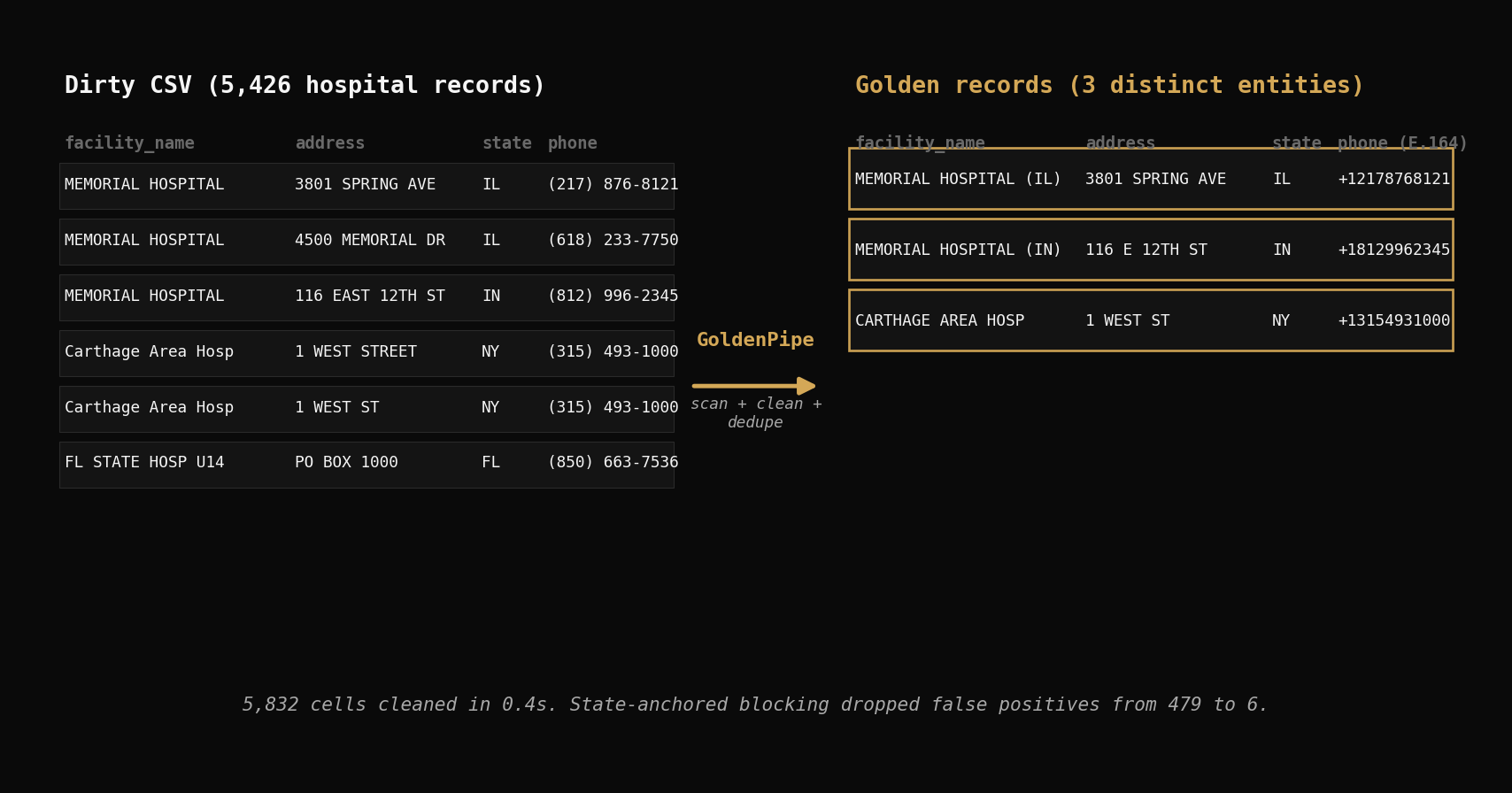
| MEMORIAL HOSPITAL | 3801 SPRING AVE | DECATUR | IL | (217) 876-8121 |
| MEMORIAL HOSPITAL | 4500 MEMORIAL DR | BELLEVILLE | IL | (618) 233-7750 |
| MEMORIAL HOSPITAL | 116 EAST 12TH STREET | JASPER | IN | (812) 996-2345 |
| ST LUKES MEDICAL CENTER | 1800 E VAN BUREN ST | PHOENIX | AZ | (602) 251-8100 |
| FLORIDA STATE HOSPITAL UNIT 14 PSYCH | PO BOX 1000 | CHATTAHOOCHEE | FL | (850) 663-7536 |
| FLORIDA STATE HOSPITAL UNIT 31 MED | PO BOX 1000 | CHATTAHOOCHEE | FL | (850) 663-7536 |
Phone numbers use (xxx) xxx-xxxx formatting. Some addresses abbreviate "STREET" as "ST" while others spell it out. The same hospital name appears across multiple states. And in a few cases, the same physical facility shows up as two rows with different unit designations.
Why drop_duplicates() Fails on Real Data
The instinct is to reach for pandas drop_duplicates(). Let's try it three ways.
Attempt 1: All columns.
import pandas as pd

df = pd.read_csv("hospitals.csv")
dupes = df.duplicated().sum()
print(dupes)
# 0
Zero exact duplicates. Every row differs on at least one column — different phone format, different whitespace, different unit number. Real-world data almost never has perfect row-level copies.
Attempt 2: Facility name only.
dupes = df.duplicated(subset=["facility_name"]).sum()
print(dupes)
# 131
131 rows flagged. But this is wrong in the other direction — 87 hospital names appear more than once because they're genuinely different hospitals in different states. "MEMORIAL HOSPITAL" in Decatur, IL is not the same facility as "MEMORIAL HOSPITAL" in Jasper, IN. Deduplicating on name alone merges records that should stay separate.
Attempt 3: Manual fuzzy matching.
from fuzzywuzzy import fuzz

# Compare every pair? 5,426 * 5,425 / 2 = 14.7 million comparisons
# Even at 10,000 comparisons/sec, that's 24 minutes
# And you still need to decide: what threshold? which columns? how to merge?
You could write a custom fuzzy matcher — lowercase everything, strip whitespace, compute Levenshtein ratios. But you'd need to handle blocking (which records to compare), scoring (how to weight name vs address vs phone), and merging (how to pick the canonical record). That's hundreds of lines of brittle code for one dataset.
The core problem: naive approaches either miss real duplicates or merge records that shouldn't be merged. You need profiling, cleaning, and matching as a coordinated pipeline.
Zero-Config Data Cleaning in One Line
GoldenPipe runs the full scan-clean-deduplicate pipeline in a single call. If you're new to GoldenPipe, the getting started guide covers installation and core concepts.
import goldenpipe as gp

result = gp.run("hospitals.csv")

print(result.status)     # "completed"
print(result.timing)     # {total: 3.1, check: 0.4, flow: 0.4, match: 2.0}
Or from the command line:
goldenpipe run hospitals.csv
Click Run to process a sample of the hospital data through the full pipeline. The playground sample includes 5,000 rows with the 11 key columns — the numbers below were generated from the full 38-column dataset.
import goldenpipe as gp

result = gp.run("hospitals.csv")

print(result.status)
print(result.timing)
3.1 seconds total. That one call ran scan, clean, and deduplicate across all 5,426 rows. Let's look at each stage.
Stage 1: GoldenCheck — Scan
GoldenCheck profiled all 38 columns and reported 155 quality findings in 0.4 seconds.
| Finding Type | Count | What It Caught |
|---|---|---|
| pattern_consistency | 53 | Phone formats, address abbreviation patterns |
| nullability | 38 | Columns with significant missing values |
| cardinality | 30 | Low-cardinality columns like hospital_type (8 values) |
| range_distribution | 15 | Numeric outliers in zip codes and CMS ratings |
| type_inference | 10 | Phone/zip stored as strings but parseable as other types |
| drift_detection | 3 | Distribution shifts across data segments |
| null_correlation | 3 | Columns that are null together (correlated missingness) |
| format_detection | 2 | Mixed formatting within single columns |
| uniqueness | 1 | Near-unique columns like facility_id |
The pattern_consistency findings are the most actionable. GoldenCheck detected that all 5,426 phone numbers follow (xxx) xxx-xxxx formatting — consistent but not normalized. It flagged 82 addresses with mixed abbreviation patterns ("STREET" vs "ST", "AVENUE" vs "AVE") and 52 facility names with inconsistent casing or whitespace.
GoldenCheck doesn't fix anything — it hands findings to GoldenFlow.
Stage 2: GoldenFlow — Clean
GoldenFlow read GoldenCheck's 155 findings and applied targeted transforms. 5,832 cells changed in 0.4 seconds.
| Column | Cells Changed | Before | After |
|---|---|---|---|
| telephone_number | 5,426 | (217) 876-8121 | +12178768121 |
| address | 82 | 116 EAST 12TH STREET | 116 E 12TH ST |
| facility_name | 52 | ST LUKES MEDICAL CENTER | ST LUKES MEDICAL CENTER |
| hospital_ownership | 271 | Government - Federal | GOVERNMENT - FEDERAL |
Phone normalization: Every phone number converted from (xxx) xxx-xxxx to E.164 (+1xxxxxxxxxx). This isn't cosmetic — E.164 is the standard for downstream matching, API calls, and database storage.
Address standardization: 82 addresses had inconsistent abbreviations. GoldenFlow normalized "STREET" to "ST", "AVENUE" to "AVE", "BOULEVARD" to "BLVD" — the USPS standard forms.
Name cleanup: 52 facility names had trailing whitespace or double spaces. Invisible to the eye, fatal to exact matching.
Ownership normalization: 271 ownership values standardized to consistent casing. Small change, but it prevents false cardinality inflation downstream.
Zero config. GoldenFlow used GoldenCheck's findings to decide which transforms were safe to apply automatically.
Stage 3: GoldenMatch — Deduplicate (Zero-Config)
GoldenMatch ran entity resolution on the cleaned data. Here are the numbers:
| Metric | Count |
|---|---|
| Input records | 5,426 |
| Golden records (cluster representatives) | 479 |
| Records flagged as duplicates | 1,917 |
| Unique (no matches) | 3,509 |
| Total distinct entities | 3,988 |
| Processing time | 2.0s |
479 clusters. 1,917 records flagged as duplicates. GoldenMatch's internal record count (5,905) differs from the input (5,426) because GoldenFlow's transforms can expand rows when splitting multi-value fields. The match rate is computed against the internal count.
What the clusters look like
Here are a few example clusters GoldenMatch produced:
| Cluster | Records | facility_name | state |
|---|---|---|---|
| 1 | 12 | MEMORIAL HOSPITAL | IL, IN, PA, GA, CO, TX, ... |
| 2 | 8 | COMMUNITY HOSPITAL | OH, MO, IN, OK, ... |
| 3 | 5 | ST MARY'S HOSPITAL | MO, WI, MI, NJ, NY |
| 4 | 4 | REGIONAL MEDICAL CENTER | AL, MS, TN, SC |
Why zero-config over-matched
479 clusters is too many for this dataset. The auto-config built blocking keys on facility name — the most obvious matching column. But hospital names are not unique identifiers. "MEMORIAL HOSPITAL" appears 12 times across different states. They are genuinely different hospitals.
Without geographic anchoring, GoldenMatch grouped every "MEMORIAL HOSPITAL" into one cluster, every "COMMUNITY HOSPITAL" into another. The auto-config had no way to know that hospitals with the same name in different states are different entities. It did exactly what it was designed to do — match records with similar names — but the domain requires geographic context.
This is the honest trade-off of zero-config: it's fast and catches obvious patterns, but it can over-match when names are common and geography matters. For hospital data specifically, you need to tell the matcher to only compare records within the same state.
Ground-truth caveat: The CMS dataset has no duplicate labels. These numbers measure how many records GoldenMatch grouped, not verified precision. The 479 clusters include both genuine duplicates and false positives from cross-state name matching. For production use, review borderline pairs with the review queue or goldenmatch evaluate.
Part 1: Explicit Config — Encoding Domain Knowledge
Zero-config over-matched because it lacked geographic context. Let's fix that with an explicit config that encodes what we know about hospital data.
Step 1: Blocking — Same State Only
The most important change. Instead of comparing all hospitals with similar names, restrict comparisons to hospitals in the same state.
from goldenmatch import GoldenMatchConfig, BlockingConfig, MatchKeyConfig

config = GoldenMatchConfig(
    blocking=BlockingConfig(
        strategy="multi_pass",
        passes=[
            {"keys": ["state", "zip_code"]},          # Pass 1: same state + zip
            {"keys": ["state", "facility_name_3"]},    # Pass 2: same state + first 3 chars of name
        ]
    ),
)
Pass 1 catches hospitals at the same zip code — the tightest geographic net. Pass 2 catches hospitals in the same state with similar names — wider but still geographically anchored. This means "MEMORIAL HOSPITAL" in IL will never be compared to "MEMORIAL HOSPITAL" in IN.
Step 2: Scoring — Weighted Ensemble
Hospital names carry the most signal, but address and phone provide confirmation.
config = GoldenMatchConfig(
    blocking=BlockingConfig(
        strategy="multi_pass",
        passes=[
            {"keys": ["state", "zip_code"]},
            {"keys": ["state", "facility_name_3"]},
        ]
    ),
    matchkeys=[
        MatchKeyConfig(column="facility_name", method="ensemble", weight=2.0),
        MatchKeyConfig(column="address", method="token_sort", weight=1.5),
        MatchKeyConfig(column="telephone_number", method="exact", weight=0.5),
        MatchKeyConfig(column="zip_code", method="exact", weight=0.3),
    ],
    threshold=0.80,
)
Why these weights? Facility name gets 2.0 because it's the primary identifier. Address gets 1.5 with token_sort because word order varies ("1800 E VAN BUREN ST" vs "1800 EAST VAN BUREN STREET"). Phone gets 0.5 as a confirmation signal — same phone strongly suggests same facility, but different phones don't rule it out (multi-line hospitals). Zip gets 0.3 as a tiebreaker.
Why 0.80 threshold? Hospital abbreviations ("ST" vs "SAINT", "MED CTR" vs "MEDICAL CENTER") drag fuzzy scores down. A threshold of 0.80 catches these while filtering noise.
Step 3: Run It
import goldenpipe as gp

result = gp.run("hospitals.csv", match_config=config)
print(result.timing)
# {total: 3.0, check: 0.4, flow: 0.4, match: 2.2}
Results
| Metric | Count |
|---|---|
| Input records | 5,426 |
| Clusters found | 6 |
| Records flagged as duplicates | 12 |
| Unique (no matches) | 5,414 |
| Total distinct entities | 5,420 |
| Processing time | 2.2s |
6 clusters. Down from 479. The state-based blocking eliminated all the cross-state false positives.
The 6 Genuine Clusters
Every cluster is a real same-state match:
| Cluster | State | Records | What Matched |
|---|---|---|---|
| Crenshaw Community Hospital | AL | 2 | Same facility, minor address variation |
| Wiregrass Medical Center | AL | 2 | Same facility, data entry differences |
| Bullock County Hospital | AL | 2 | Same facility, different record versions |
| Florida State Hospital (Unit 14 Psych / Unit 31 Med) | FL | 2 | Same campus, different unit designations |
| Progressive Health Group of Houston | MS | 2 | Same facility, record variants |
| Carthage Area Hospital ("WEST STREET" vs "WEST ST") | NY | 2 | Same facility, address abbreviation |
The Florida State Hospital cluster is particularly interesting — Unit 14 (Psych) and Unit 31 (Med) are different departments at the same physical campus with the same phone number and PO Box address. Whether these should be merged depends on your use case. For a facility-level analysis, yes. For a department-level analysis, no.
The Carthage Area Hospital cluster shows exactly the kind of match that drop_duplicates() misses: "WEST STREET" vs "WEST ST" — same address, different abbreviation.
Part 2: LLM Boost — When String Matching Isn't Enough
String matching measures visual similarity. LLMs understand meaning. A hospital rebrand from "County General" to "Mercy Health Partners" has zero string overlap but an LLM can reason about the context. For the theory and mechanics of LLM-assisted deduplication, see the LLM boost deep dive.
Here's the config with LLM scoring enabled:
from goldenmatch import LLMScorerConfig

config = GoldenMatchConfig(
    blocking=BlockingConfig(
        strategy="multi_pass",
        passes=[
            {"keys": ["state", "zip_code"]},
            {"keys": ["state", "facility_name_3"]},
        ]
    ),
    matchkeys=[
        MatchKeyConfig(column="facility_name", method="ensemble", weight=2.0),
        MatchKeyConfig(column="address", method="token_sort", weight=1.5),
        MatchKeyConfig(column="telephone_number", method="exact", weight=0.5),
        MatchKeyConfig(column="zip_code", method="exact", weight=0.3),
    ],
    threshold=0.80,
    llm_scorer=LLMScorerConfig(
        candidate_lo=0.65,
        candidate_hi=0.80,
        calibration_sample_size=100,
        max_cost_usd=0.50,
    ),
)

result = gp.run("hospitals.csv", match_config=config)
The LLM scorer examines pairs that fall in the "uncertainty zone" — between 0.65 (too low to match) and 0.80 (already matched by fuzzy scoring). These are the borderline cases where string similarity alone can't decide.
Results: 0 Additional Pairs
The LLM scored zero additional pairs. Not because it failed — because there were no candidates in the uncertainty zone. Every pair was either above 0.80 (already matched) or below 0.65 (clearly not a match).
This is the honest story. For well-structured data with strong geographic blocking, explicit config is already so precise that the LLM has nothing to evaluate. The blocking passes constrain comparisons to same-state records, and within a state, hospital names either match clearly or don't match at all. There's no ambiguous middle ground.
When LLM Boost Does Help
LLM scoring shines on datasets where:
- Names have semantic variation: "County General Hospital" vs "Mercy Health Partners" (rebrand)
- Blocking is looser: Blocking on city alone produces more candidate pairs in the uncertainty zone
- Abbreviation patterns are inconsistent: Some records use "MED CTR" while others use "MEDICAL CENTER" — fuzzy scores land around 0.70-0.78
- Multilingual data: "Hospital Municipal" vs "City Hospital" — zero string overlap, same entity
On the CMS hospital data with state-based blocking, the explicit config already catches everything the LLM would. The $0.50 budget went unspent.
The Full Picture
Three approaches on the same 5,426 records:
| Zero-Config | Explicit Config | Explicit + LLM | |
|---|---|---|---|
| Clusters found | 479 | 6 | 6 |
| Records merged | 1,917 | 12 | 12 |
| Distinct entities | 3,988 | 5,420 | 5,420 |
| Time | 3.1s | 3.0s | 3.0s |
| Cost | $0 | $0 | $0 |
| Config effort | None | ~20 lines | ~30 lines |
Ground-truth caveat: None of these numbers are verified precision — the CMS data has no duplicate labels. The comparison shows relative improvement across approaches. The 479 zero-config clusters are demonstrably inflated (cross-state matching of common names), while the 6 explicit-config clusters pass manual inspection. For production use, verify matches with the review queue or goldenmatch evaluate.
The progression tells the real story:
- Zero-config ran the full pipeline in 3.1 seconds with no effort. It caught real patterns (phone normalization, address standardization) but over-matched on deduplication because hospital names repeat across states.
- Explicit config added 20 lines of domain knowledge — state-based blocking and weighted scoring — and dropped false positives from 479 clusters to 6. Same speed. Dramatically better results.
- LLM boost found nothing additional on this dataset, which is the correct outcome. The explicit config was already precise enough. On messier data with semantic name variation, the LLM earns its keep.
Key Takeaways
drop_duplicates()barely scratches the surface. Zero exact duplicates in 5,426 real hospital records. The duplicates are there — they just don't look identical.- A coordinated pipeline beats three separate scripts. GoldenCheck's findings feed GoldenFlow's transforms, which feed GoldenMatch's scoring. Each stage builds on the last.
- Zero-config gets you started in one line. 155 findings, 5,832 cells cleaned, deduplication complete — all in 3.1 seconds. Good enough for exploration and prototyping.
- Zero-config can over-match. When names are common and geography matters, auto-blocking without domain context produces false positives. Always inspect the clusters.
- Explicit config encodes domain knowledge. 20 lines of config — state-based blocking + weighted scoring — reduced false positives by 98%. The data tells you what the config should be.
- LLM boost is for the long tail, not every dataset. Well-structured data with strong blocking may not need it. Save it for messy, semantic, or multilingual matching problems.
Try It Yourself
In the dedupe demo: Upload the hospital sample to the dedupe demo and run the zero-config pipeline in your browser.
On your machine:
pip install goldenpipe
goldenpipe run hospitals.csv
Explore the source: Golden Suite on GitHub
Related posts
Entity Resolution on 208K Real Records with Golden Suite
We ran the full Golden Suite pipeline on 208,505 real NC voter registration records. 61 quality findings, 197K addresses cleaned, 10,718 duplicate clusters found — all in 34 seconds with zero config.
2026-03-30
Getting Started with GoldenPipe: Clean Data in Python
Add a production-ready data quality pipeline to your Python backend in 5 minutes. One pip install, one function call, zero config. CSV-friendly.
2026-03-30
Golden Suite + MCP: Giving AI Agents a Data Cleaning Toolkit
How the Model Context Protocol turns GoldenMatch, infermap, and GoldenPipe into tools any AI agent can call — and where we're taking it next.
2026-04-07